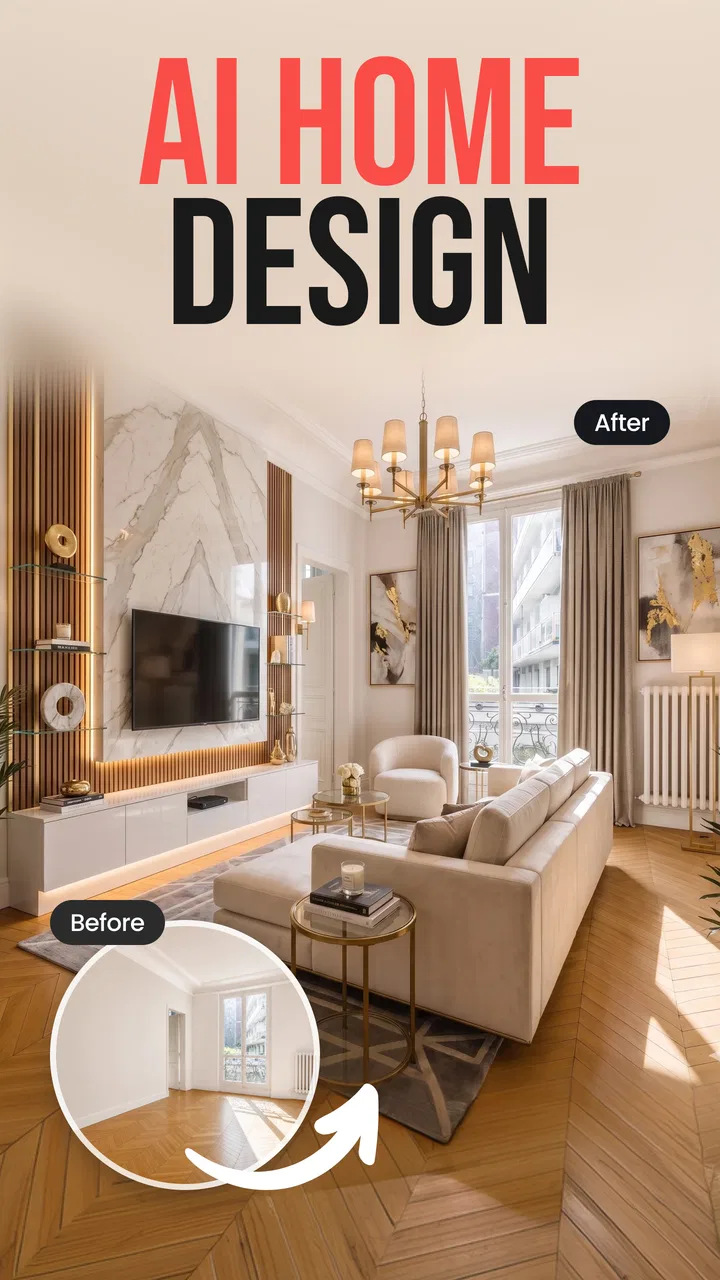
Home Interior Decor: AI Design
- 4.1
- Rating
- 100.00K
- Installs
- Free
- Price

 Analysis by App-foxy
I tried Home Interior Decor: AI Design with a practical question in mind: would it still be useful after the first few impressive room concepts, or would it become another app I open once and forget? My early impression was positive. It turns the vague idea of “I want to improve this room” into something visual, which is often much easier to react to than a written shopping list or a collection of unrelated inspiration images.
This is a free home and interior design app from GRIMLAX TRADE, S.L., aimed at people who want to explore decorating ideas with AI. It is available for everyone by age rating, runs on devices using at least Android 10, and its current version is 1.10.0. The app has reached over 100 thousand installs, with an average score of 4.1 from more than 500 ratings. Those figures suggest a product that has attracted real curiosity, although they do not remove the need to judge whether the experience fits your own decorating habits.
From first-week inspiration to everyday usefulness
I find the shift from first-week curiosity to regular use depends less on how many concepts I can make and more on whether I turn each one into a small, testable decision. A note about what I want to change—comfort, storage, or visual clutter—can keep later sessions focused and make the results easier to compare. That practical habit leads to the bigger question of whether the app remains useful once the initial novelty wears off.
You May Also Like

 Blood Strike: 2.5 Anniversary
Blood Strike’s Loadouts Turn Every Drop Into a Tactical Gamble
A close look at Blood Strike’s custom loadouts: how fast access to signature weapons reshapes its battle royale rhythm, rewards preparation, and narrows the gap between fights.

 Pandora - Music & Podcasts
Pandora’s Music Is Easy to Start, but Harder to Recover
Pandora’s strength is its low-effort path from a seed to a station. Its weak spot is how much confidence it asks you to place in connection, setup, and quiet recovery.

 8 Ball Pool
 Is Built on Rivalries, Rematches, and Routine
A close look at the rivalries, rematches, shared routines, and unanswered safety questions that turn a quick pool match into a persistent mobile community.

 Samsung Music
’s Quiet Strength Is Playing What You Already Own
Its reach comes less from spectacle than from dependable access to a personal library. That simplicity is both the app’s strongest retention engine and its ceiling.

 AccuWeather: Weather Radar
AccuWeather Review: A Quick, Clear Forecast for Everyday Decisions
For everyday plans, the best forecast is the one you can understand quickly. AccuWeather makes rain timing, radar, and local conditions easy to act on, with a few trade-offs.

 Hill Climb Racing
Why Hill Climb Racing Still Turns Crashes Into One More Run
A tiny car, a bumpy hill and one more upgrade: Hill Climb Racing keeps resurfacing because its simple chaos makes every near-miss feel personal.
More From Our News Desk



The first few sessions are the strongest
The main appeal is immediate: instead of trying to imagine how a different style might look in your own space, you can use AI-generated visual direction to explore possibilities. That makes the app especially approachable for someone who knows a room feels dull or unfinished but cannot name the exact problem. Seeing a possible change gives me something concrete to evaluate: warmer or cooler colors, a more minimal atmosphere, a denser arrangement, or a different decorative mood.
I found the visual approach more useful than beginning with a conventional catalog. A catalog assumes I already know what I want to buy. This app is better at the earlier stage, when I am still deciding what kind of room I want. It is also less intimidating than professional design software, where a beginner can spend more time learning controls than thinking about the room itself.
That simplicity is a genuine strength, but it also creates the first important limitation. An AI concept is not the same as a renovation plan. A generated image can suggest a direction without proving that the furniture will fit, that the lighting exists in the room, or that the materials are practical for daily use. I treat each result as a conversation starter rather than a final specification.
A realistic weekend use case
Imagine a small living room that has become a storage area for miscellaneous items. On a Saturday morning, I would take the existing room as my starting point, use the app to explore a few visual directions, and compare the results before buying anything. The useful step is not choosing the prettiest image. It is identifying one manageable change, such as reducing visual clutter, changing the dominant color, or rearranging the focal point.
That workflow prevents a common decorating mistake: purchasing several attractive objects that do not work together. I would save the concept that feels closest to the room’s actual proportions, then make a short list of changes in order of impact. A new layout may matter more than decorative accessories, and a better color balance may matter more than replacing every piece of furniture.
The app is particularly handy for discussing ideas with another person. Instead of saying “maybe we should make it more modern,” I can show a visual interpretation and ask what feels right or wrong about it. That makes disagreements more specific. One person may like the colors while rejecting the amount of furniture, which is much easier to resolve than an abstract style debate.
What makes the novelty last a little longer
The first-week appeal does not depend only on producing one attractive room. It comes from comparing alternatives. I recommend changing one design variable at a time whenever possible. First explore the overall style, then look at color direction, then consider the level of decoration. If everything changes between attempts, it becomes difficult to understand why one result feels better than another.
Another useful habit is to judge concepts against real constraints before becoming attached to them. I ask myself whether the room receives natural light, whether the proposed atmosphere would survive everyday mess, and whether the suggested arrangement leaves enough space to walk comfortably. This is where the app becomes more than a source of pretty pictures: it helps me clarify priorities, provided I do the practical filtering myself.
The best early use is decision-making, not shopping. I would not open it expecting a precise product list or a professional floor plan. I would open it when I need visual permission to consider a different direction and want to test that direction before spending money.
Does it earn a place after the first month?
A month later, I would judge the app by whether it helps me make progress across changing household needs, not by whether I still want to browse room ideas for their own sake. Returning with a different room or a new constraint can give the visual exploration a fresh purpose, while repeating the same open-ended searches may not. The distinction matters when deciding whether this belongs in my regular decorating toolkit.
Recurring value comes from changing rooms and changing needs
After the initial excitement fades, the app’s value depends on whether I have a real design question to revisit. Someone moving between homes, preparing a guest room, updating a home office, or gradually improving several rooms will find more reasons to return than someone who has already settled on a style and has no upcoming changes.
The app can also support phased projects. I might use it at the beginning to choose a direction, return later when I am ready to tackle the lighting or storage problem, and revisit the room after living with the first changes. That is more realistic than trying to complete a whole home in one session. Interior design usually happens through adjustments, and visual comparison can help keep those adjustments coherent.
There is a useful distinction between inspiration and accountability. Inspiration gives me ideas; accountability means checking whether those ideas still make sense once I consider budget, cleaning, children, pets, or limited space. The app supplies the first part well. The lasting value comes from using each concept as a checkpoint against the way I actually live.
Who will return to it regularly?
I see three groups getting the most ongoing benefit. The first is a renter who cannot make major structural changes but wants to improve atmosphere through layout, color, and decor. The second is a homeowner working room by room rather than carrying out one large project. The third is a visually minded person who enjoys testing alternatives before committing to a purchase or rearrangement.
It is also useful for people who struggle to communicate a design preference. If terms such as “contemporary,” “cozy,” or “clean” feel too broad, visual examples help narrow the conversation. A couple planning a shared space could use several concepts to discover which elements they agree on, even if neither person has formal design experience.
On the other hand, I would not make this my main tool for a technically demanding renovation. If the project involves structural changes, electrical work, exact measurements, accessibility requirements, or detailed construction planning, a specialist or a more precise planning application is the better choice. AI visualization can support the discussion, but it should not replace professional judgment where safety and fit are involved.
Free access and the point where expectations change
The app is free to install, which makes experimenting easy. That matters because the first stage of decorating often involves uncertainty, and I would rather test an idea visually before paying for materials. There are in-app purchases ranging from $9.99 to $35.99 per item, so I would pay attention to what is available without spending and decide whether the deeper use justifies the cost for my project.
My advice is to establish a clear purpose before considering a purchase. If I only need a few concepts for one room, the free experience may be enough. If I am comparing many rooms or using the app as a continuing design notebook, paid options could become easier to justify, but only if they meaningfully improve the workflow rather than simply encouraging more generations.
This is also where the app’s 4.1 average feels informative rather than definitive. A score in that range indicates a generally favorable reception, but it also leaves room for different expectations. People looking for quick inspiration may be satisfied, while users expecting architectural precision or unlimited professional-grade control may feel less impressed.
Maintenance, friction, and the reasons enthusiasm can fade
I would keep enthusiasm from fading by treating each session as a short decision step: name the room’s problem, compare a few directions, and leave with one action to check in the real space. That approach also makes it easier to notice when an attractive concept is creating more work than it solves. With that balance in mind, the remaining friction is worth weighing against who can use the app comfortably and in what situations.
The maintenance burden is mostly mental
Using the app itself is not the difficult part. The larger maintenance task is keeping generated ideas connected to reality. Every concept needs a second review: does it suit the room’s light, traffic, storage needs, and cleaning routine? A design that looks calm in an image may be inconvenient if it depends on open shelving, delicate surfaces, or furniture that blocks the natural path through the room.
I recommend keeping a simple separation between “visual direction” and “actionable change.” The visual direction might be a softer palette or a more open feeling. The actionable change could be removing one bulky item, grouping accessories, or relocating a lamp. This prevents the app from turning into a source of endless ideas that never become improvements.
There is another maintenance issue: personal taste changes while a project is in progress. After viewing many variations, I can start reacting to novelty rather than quality. To avoid that, I would return to the original goal before each session. Was I trying to make the room easier to clean, more welcoming, more functional for work, or simply less cluttered? A concept that answers the goal is more valuable than one that merely looks different.
Where AI concepts need careful interpretation
AI visualization is persuasive because it gives a finished-looking result. That polish can hide practical questions. I would be cautious about assuming that every object, texture, proportion, or lighting effect shown in a concept can be reproduced exactly. The image is useful for mood and composition, but it should not be treated as a guarantee of availability, scale, or material behavior.
This matters most in small rooms. A concept may appear spacious because the image emphasizes a clean arrangement, while the real room has doors, radiators, windows, or awkward corners that change what is possible. Before buying anything, I measure the space and mark walking routes. The app can help me decide what I want those measurements to achieve, but it cannot make the measurements unnecessary.
Color also deserves a reality check. Screen brightness, surrounding colors, and natural light can change how a shade feels. I would use the app to choose a general color family, then test physical samples or inexpensive temporary options in the actual room. That extra step prevents an attractive digital result from becoming an expensive mismatch.
What may cause fatigue after repeated use
The main source of fatigue is the temptation to keep generating alternatives without making a decision. At first, every new concept feels productive. Later, the differences may become less meaningful, and I can lose sight of the room I am actually trying to improve. Setting a limit helps: compare a small group of directions, identify the shared elements I like, and stop once one option clearly meets the purpose.
Another possible frustration is the gap between visual ambition and practical budget. A concept may inspire a complete transformation when the sensible project is a smaller update. I get more value when I translate the image into categories rather than copying it literally: improve warmth, reduce clutter, create a focal point, or make the room feel lighter. That translation keeps the app useful even when I cannot reproduce the entire scene.
There is also a risk of style drift. If I explore unrelated looks every time I open the app, the home can become a collection of disconnected experiments. I would keep a short description of the direction I have chosen and use it as a filter for later ideas. The app is better at expanding possibilities than enforcing consistency, so that responsibility remains with me.
When another option is better
For exact furniture placement, a measurement-based room planner is more appropriate. For construction decisions, a professional designer or contractor is safer. For finding specific products, a retailer’s visualizer or a focused shopping platform may be more efficient. For collecting broad inspiration, image boards can offer a larger range of references.
Home Interior Decor: AI Design makes the most sense between those stages. It is more personal than a general inspiration feed because the aim is to visualize a room, but it is less technical than a planning tool. That middle position is its identity, and it is also its boundary. I would use it to decide what deserves further investigation, not as the final authority on how a renovation should be executed.
My long-term verdict
After the novelty fades, I think the app can earn lasting space if I use it as a periodic design checkpoint rather than a daily entertainment feed. Its recurring value is strongest when a real room, a real constraint, and a real decision are waiting. It helps turn an uncertain decorating idea into something I can compare, discuss, and reduce to practical next steps.
I would recommend it to renters, homeowners, couples planning shared spaces, and anyone who needs visual help before committing to a decorating direction. I would especially recommend a slow workflow: start with the room’s purpose, compare a few concepts, identify one achievable change, and check every idea against measurements and maintenance.
I would skip it as a primary solution if I need exact technical planning, product-level shopping guidance, or professional renovation documentation. I would also be cautious about paying for additional access until I know that the app fits my process, since the available purchases can reach $35.99 per item.
Overall, Home Interior Decor: AI Design succeeds when it is used to think more clearly about a home, not when it is asked to make every decision. Its strongest contribution is visual exploration; its weakness is that attractive concepts can encourage unrealistic expectations or endless browsing. If I keep that distinction in mind, the app remains useful beyond the first week and can support room updates month after month without taking over the project.
FAQs for Home Interior Decor: AI Design
01What is Home Interior Decor: AI Design?
Home Interior Decor: AI Design is an AI-powered decorating app that helps you visualize ideas for rooms in your home. After uploading or selecting a room image, you can explore different interior styles, color combinations, furniture arrangements, and decorative concepts. It is designed for inspiration and planning, whether you are refreshing one corner, redesigning a complete room, or simply comparing styles before making changes.
02How does the AI room design feature work?
The app generally works by using a photo of an existing room or an image representing the space you want to decorate. You can choose a preferred design style, such as modern, minimalist, classic, Scandinavian, or another available option, and the AI generates a redesigned version. Results may vary depending on lighting, image quality, room layout, and how clearly the original space is shown.
03Can I use the app to plan real renovations or buy furniture?
Home Interior Decor: AI Design can be useful for collecting ideas and visualizing possible renovations, but it should not be treated as a precise architectural, construction, or measurement tool. Generated images may change proportions, materials, lighting, or furniture placement. Before purchasing products or starting work, verify dimensions manually and consult a professional when structural, electrical, plumbing, or safety decisions are involved.
04Is Home Interior Decor: AI Design free to download and use?
The app may be available to download for free, but some features can require in-app purchases, a subscription, credits, or viewing advertisements. Premium options may include additional design styles, higher-quality generations, faster processing, or fewer restrictions on saved results. Check the current Google Play Store or App Store listing carefully for pricing, trial conditions, renewal terms, and cancellation instructions before subscribing.
05What should I know about privacy when uploading room photos?
Because the app may process uploaded images through AI services, you should review its privacy policy before sharing photos. Avoid including people, children, personal documents, addresses, valuables, or other sensitive details in room images. It is also worth checking whether photos are stored, used to improve the service, shared with third parties, or automatically deleted after processing, as these practices can change with app updates.
Pros
- Generates multiple room styles quickly from a single photo.
- Useful for exploring color palettes before starting a renovation.
- Offers inspiration for different furniture and decor arrangements.
- Simple interface makes it accessible to users without design experience.
- Can help visualize ideas when planning a room makeover.
Cons
- AI results may distort windows
- doors
- or existing furniture.
- Some designs can look unrealistic or impractical to recreate.
- The best styles and features may require a subscription.
- Results depend heavily on photo quality and room lighting.
- Generated images may not accurately reflect real product sizes or costs.

Home Interior Decor: AI Design
Gallery